


Global eSIM Unleashed: Roam Free in 200+ Countries Without Switching SIMs
A global eSIM is the ultimate key to borderless connectivity, replacing physical SIM cards with a reprogrammable chip embedded in your device. It lets you instantly download and switch between carrier profiles from anywhere, meaning you can activate a local data plan the moment you land without hunting for a store. This built-in flexibility delivers seamless roaming, transparent pricing, and the freedom to manage multiple numbers from one simple interface—all while keeping your home line active. For any traveler, a global eSIM transforms a smartphone into a truly universal tool, making international connection effortless and immediate.
What Exactly Is a Global eSIM and How Is It Different From a Physical SIM?
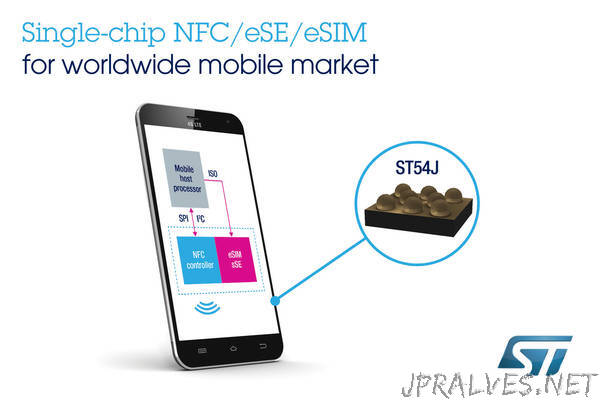
A global eSIM is a **digital SIM profile** embedded directly into your phone, letting you download and switch between international carrier plans without ever touching a plastic card. Unlike a physical SIM, which you must physically insert and swap, a global eSIM connects you to partner networks across multiple countries using a single downloadable data package. The core difference is convenience: you buy a plan online, scan a QR code, and you’re online in minutes—no hunting for a local store or fumbling with tiny trays. Physical SIMs tie you to one carrier per card, while a global eSIM lets you store several profiles and activate the one you need instantly.
The real kicker is that you can keep your primary physical SIM active for calls while using the global eSIM purely for data, turning your phone into a dual-network travel tool.
Speed and flexibility are the entire appeal.
The Core Technology Behind a Digital SIM Card
The core tech behind a digital SIM is a tiny, secure piece of software called a eUICC (embedded Universal Integrated Circuit Card) soldered directly onto your phone’s motherboard. Instead of a removable chip storing one carrier profile, this chip holds multiple encrypted profiles that you can switch remotely. When you scan a QR code or download a plan, your device securely pulls that carrier’s credentials and installs them into the eUICC’s protected memory. This uses the same cryptographic authentication as a physical SIM, but the provisioning happens over the internet—no swapping needed. The active profile behaves identically to a traditional SIM, handling network authentication, encryption keys, and roaming data, but it lives entirely in firmware.
Key Differences Between a Plastic SIM and an Embedded SIM
The core Key Differences Between a Plastic SIM and an Embedded SIM revolve around physical presence and removability. A plastic SIM is a removable card you insert into a tray, while an embedded SIM (eSIM) is a soldered chip permanently fixed inside the device. You cannot swap an eSIM by hand; instead, you download a profile digitally. Plastic SIMs tie your number to a single card, requiring physical transfer between phones. Conversely, an eSIM allows instant switching between multiple carrier profiles without touching hardware. A plastic SIM is fragile and can be lost, whereas an eSIM is durable and tamper-resistant. For global travel, an eSIM eliminates the need to source and insert a local plastic SIM, letting you activate a data plan remotely.
- Plastic SIMs are removable and transferable; eSIMs are fixed and reprogrammable.
- Plastic SIMs require physical delivery or store pickup; eSIMs are downloaded over Wi-Fi or cellular.
- Plastic SIMs hold one carrier profile; eSIMs store several profiles for instant switching.
- Plastic SIMs occupy a tray slot; eSIMs free up internal space for other components.

How Does a Worldwide Data Plan Actually Work When You Travel?
A worldwide data plan with a global eSIM works by swapping your phone’s home carrier profile for a digital SIM that connects to local partner networks the moment you land. When you travel, your device automatically scans for a compatible tower in that country, then registers your eSIM with the network—no physical card or store visit needed. The plan you bought beforehand, measured in gigabytes, is managed remotely by your eSIM provider, which tracks your usage and renews or stops service when you hit your limit. Your phone treats it like the primary data source, so all apps, maps, and messaging run through that foreign network’s internet, while your original number can stay inactive or on Wi-Fi calling. Speeds vary by country, but the handoff is seamless—you just disable roaming on your old SIM and enable the eSIM profile for instant connectivity.
Understanding Network Roaming Partnerships and Local Tower Switching
When you travel with a global eSIM, your device connects by leveraging network roaming partnerships between your eSIM provider and local operators. Instead of one universal tower, the eSIM scans for available partner networks in your current region, then automatically selects the strongest compatible signal. This “local tower switching” happens in real time, so you move between cities or countries without manually changing settings; your phone hops from one partner tower to another based on signal strength and congestion. The quality of your connection depends entirely on which local carriers your eSIM provider has agreements with in that specific area.
- Your eSIM prioritizes partner towers over non-partner ones, even if a non-partner signal is stronger, to enforce billing rates.
- Tower switching occurs during idle moments or call setup, causing brief data pauses (1–3 seconds) without dropping active sessions.
- You can manually lock your phone to a specific partner network in your device’s carrier settings to avoid frequent automatic switches.
Why You Get Local Rates Instead of International Roaming Fees
A global eSIM eliminates roaming fees by reconnecting your device to a local network in your destination country. Instead of your home carrier’s network authenticating you through expensive international agreements, the eSIM profile switches to a regional partner. This means you are billed at that country’s domestic data rate, not your home operator’s inflated markup. Because the data never routes back through your home network, the cost structure mirrors what a native subscriber pays. The result is a direct, per-megabyte price that reflects local infrastructure costs, not cross-border wholesale tariffs.
- Arrive and scan the QR code or install the profile before departure.
- Upon landing, your phone selects the strongest local tower using the eSIM’s pre-negotiated partnership.
- All data requests originate and terminate within that local network, so billing uses the regional rate sheet.
This process effectively turns your phone into a local device, which is why you pay local rates instead of international roaming fees for every session.
Step-by-Step: How to Set Up and Activate Your First International eSIM Profile
To activate your first international eSIM, confirm your phone is carrier-unlocked and supports eSIM, then purchase a global data plan from a provider like Airalo or Holafly. After checkout, you’ll receive a QR code or installation link—scan it via *Settings > Cellular > Add eSIM* on iPhone, or *Settings > Connections > SIM manager* on Android. Follow the on-screen prompts to label it “Travel,” and ensure data roaming is toggled on for that line. Activate it only when you land to preserve the validity window, since most plans start at first connection. **Pro tip:** Install the profile before departure but keep it off until arrival—this avoids accidental activation mid-flight. *Q: Why won’t my eSIM connect?* A: Force a network search manually, then toggle airplane mode for 30 seconds to refresh tower registration.
Scanning a QR Code vs. Manual Installation on iOS and Android
When activating a global eSIM, scanning a QR code is the fastest method, as both iOS and Android cameras recognize the eSIM profile instantly, requiring only a Wi-Fi or cellular connection. On iOS, navigate to Settings > Cellular > Add eSIM; on Android, go to Settings > Network & Internet > SIMs > Add eSIM. If the QR code is damaged or email delivery fails, manual installation demands entering the activation code (SM-DP+ address and confirmation code) via the same menus—on iOS, tap “Enter Details Manually,” while Android users select “Enter code instead.” Manual entry is prone to typos, especially with long alphanumeric strings, so triple-check each character. QR scanning auto-fills all fields, reducing setup errors and cutting activation time to under a minute, whereas manual input typically takes two to five minutes.
How to Switch Between Multiple Data Plans on One Device
Switching between multiple data plans on one device is instant once your eSIM profiles are installed. Open your device’s cellular settings—on iPhone, tap **Cellular**, then **Cellular Plans**; on Android, go to **Network & Internet** and **SIMs**. Toggle off the active profile and toggle on the new one; your phone re-registers to the new network in seconds. For automatic routing, designate one plan for data and another for calls, then enable “Allow Cellular Data Switching” to hop between networks when signal drops. To avoid roaming surprises, lock each profile to a specific plan via “Data Roaming” toggles, and label profiles by destination (e.g., “Japan–Sakura”) for one-tap swaps.
What Are the Real-World Benefits of Using a Digital SIM for Frequent Flyers?
For frequent flyers, a global eSIM eliminates the physical hassle of swapping SIM cards at every destination, meaning you land with data already active. You avoid exorbitant airport roaming kiosk prices by pre-purchasing a regional or global data package that works across multiple countries on one profile. This allows you to keep your primary number active for calls and SMS while using the eSIM solely for data, preserving battery life by avoiding constant SIM tray access. Managing connectivity becomes a simple app-based task, letting you track usage in real time. However, the advertised speed often depends on local partner networks, which can vary significantly from your home carrier’s performance. Ultimately, the core benefit is instant, predictable connectivity without per-trip admin, combined with significant cost savings versus daily international passes, all within a single digital profile.
Keeping Your Primary Number Active While Using a Second Data Line
Your primary number stays fully reachable for calls and SMS even while a second eSIM handles your data abroad, so you never miss a banking code or a family check-in. This dual-line continuity strategy means you can keep iMessage and WhatsApp tied to your home number while the data line provides local rates for navigation and streaming. You simply toggle the second line for internet, leaving your primary active on the cellular network. The result is zero downtime for two-factor authentication, and no need to announce a temporary number to contacts. Your primary line simply works as it always does, quietly in the background, while your data usage runs on a separate, cheaper connection.

Instant Connectivity Upon Landing Without Hunting for a Local SIM Shop
The second the plane door opens, your phone pings with a welcome message—no desperate dash through the arrivals hall to find a kiosk. With a global eSIM, activation happens before you even leave your seat, so you’re ordering an Uber while others are still arguing over currency exchange. You skip the queue of tired travelers clutching paper confirmation codes and the awkward “do you sell data plans?” charade. Instead, you tap your screen, pick the local data package from your eSIM app, and you’re live. No tiny SIM ejector tool, no passport photocopies, no paying double for airport convenience. Just land, glance at your map, and walk straight to the taxi line.
Cost Transparency: Paying One Flat Rate for Multiple Countries
For frequent flyers, the most tangible win of a global eSIM is predictable travel data costs, eliminating the dreaded bill shock after a multi-stop trip. Instead of juggling separate carrier fees or hunting for local SIMs at each airport, you pay one flat rate that covers every country on your itinerary. This single upfront charge means you know exactly what you are spending before you even board, turning a complex web of currency conversions and roaming tariffs into a simple line item. It is a straightforward trade: one payment, one clear price, and zero anxiety over accidental data usage draining your account while you hop borders.

How to Choose the Right Worldwide Data Package for Your Trip

Choosing the right worldwide data package for your trip begins with auditing your destination list and usage habits. Start by verifying that a global eSIM covers every country on your itinerary, as some plans exclude specific regions. Next, compare the total data allowance against your typical daily consumption, factoring in streaming and navigation, which drainGBs quickly. Prioritize packages with flexible validity periods that match your exact travel dates, avoiding rigid 30-day plans for short trips. Check whether the plan supports 5G speeds and tethering, since some budget options throttle connectivity. Crucially, confirm the package activates automatically upon arrival to New Zealand eSIM avoid manual network setup. Finally, read the fair usage policy to ensure unlimited tiers don’t silently cap bandwidth after a set threshold, then select a plan with customer support accessible via chat for mid-trip troubleshooting.
Comparing Coverage Maps: What Happens in Countries Without a Partner Network
When comparing coverage maps, pay attention to what happens in countries without a partner network. A global eSIM plan may show “global” reach, but the map’s fine print reveals whether you get full-speed data or fallback to 2G/3G emergency roaming. In unpartnered countries, you typically face three outcomes: first, your connection drops to a regional carrier with throttled speeds; second, you incur pay-per-MB rates far above your plan’s home-zone pricing; or third, you get no service at all until you manually select a local network. Always test the map’s “unpartnered” layer before purchase, not the marketing headline. The practical sequence is:
- Identify countries you’ll visit that lack a listed partner.
- Check the provider’s roaming agreement—does it include a fallback carrier or only emergency calls?
- Calculate the per-MB cost for that fallback, as it often exceeds your regular plan by 10–20x.
This determines whether you need a separate local SIM for those stops.
Data Speed vs. Data Amount: Which Matters More for Navigation, Streaming, and Work Calls
For travel connectivity, the priority between speed and volume hinges entirely on your task. Navigation, despite common belief, is surprisingly data-light; even with real-time traffic, it consumes only a few megabytes per hour, meaning low-speed, high-volume eSIM plans work perfectly here. Streaming, however, is voracious: standard-definition video uses roughly 1GB per hour, so a large data allowance matters more than a 5G connection because you will exhaust your cap long before speed becomes a bottleneck. Work calls, particularly VoIP, are the middle ground, requiring a consistent, stable connection of around 1-2 Mbps, making minimum throughput more critical than raw peak speed or total gigabytes. Thus, choose your plan based on your most demanding activity’s volume, not the marketing number for speed.
Q: Data Speed vs. Data Amount: Which Matters More for Navigation, Streaming, and Work Calls?
A: For streaming, data amount wins absolutely, as caps are hit before speed deficits are noticed. For work calls, a reliable minimum speed (2 Mbps) is non-negotiable, otherwise calls drop, even with abundant data. For navigation, neither is a real concern, any low-tier plan suffices, meaning your choice should be dictated by the heaviest activity you plan to perform.
Checking Device Compatibility Before You Buy—And What to Do If Your Phone Isn’t Supported
Before buying a global eSIM, check if your phone is eSIM-compatible and carrier-unlocked. Most newer models from Apple, Samsung, and Google support eSIM, but budget or older devices might not. You can verify by dialing *#06#—if an EID number appears, you’re good. If your phone isn’t supported, don’t panic: you can use a physical SIM from a regional travel provider, or pick up a cheap, eSIM-ready hotspot device instead. Also, ensure your phone’s software is updated, as older OS versions sometimes block eSIM functionality.
Q: What if my phone isn’t eSIM-ready?
A: Grab a portable hotspot with a data plan, or stick to a traditional travel SIM—both work fine, just less conveniently.